

AV Mail Viewer Offline
Open EML, MSG, MBOX and more — no account, no internet, no tracking. Everything stays on your device.
Your mail never leaves your device.
No internet needed
The apps work fully offline. The Android app has no internet permission at all.
No account
No sign-up, no login, nothing to remember.
No tracking
No analytics, no advertising, no data collected or uploaded.
You stay in control
Opening online images or links is always your choice, one message at a time.
Free for Windows and Android.
Windows 1.2.0 · Android 1.0.0
Windows installer
Windows 10 or 11, 64-bit. Installs for your user — no administrator rights needed.
SHA-256 checksum
e14cd86f497f4226224db2da785700629ec6ad4ee91f8e42d7b8d168d019c198Android APK
Android 10 or newer. Opens .eml, .mbox, .emlx and .mht files. No permissions required.
SHA-256 checksum
90c3de8a8f8403909d56881016dcaf6ce6849297defbdfbd172fd7f77e8673ddWindows portable ZIP
Unzip anywhere and run AVMailViewer.exe. Nothing is installed.
SHA-256 checksum
0a3706be430845f6dc4667b68ec71617a0d6d0ac6da7fe4bde1d42d513a1faa4New apps without a paid publisher certificate show a warning on first run (Windows: More info → Run anyway; Android: Install anyway). Compare the checksum above to confirm your download is untouched.
Everything you need to read a mail file.
Opens the files others can’t
EML, MSG and OFT (Outlook), EMLX (Apple Mail), MBOX archives and MHT/MHTML. Files with an unknown extension are recognised by their content.
Private by design
Works with no internet. No account, no analytics, no ads. Scripts and online content in emails are blocked, which also stops tracking pixels.
Attachments, handled
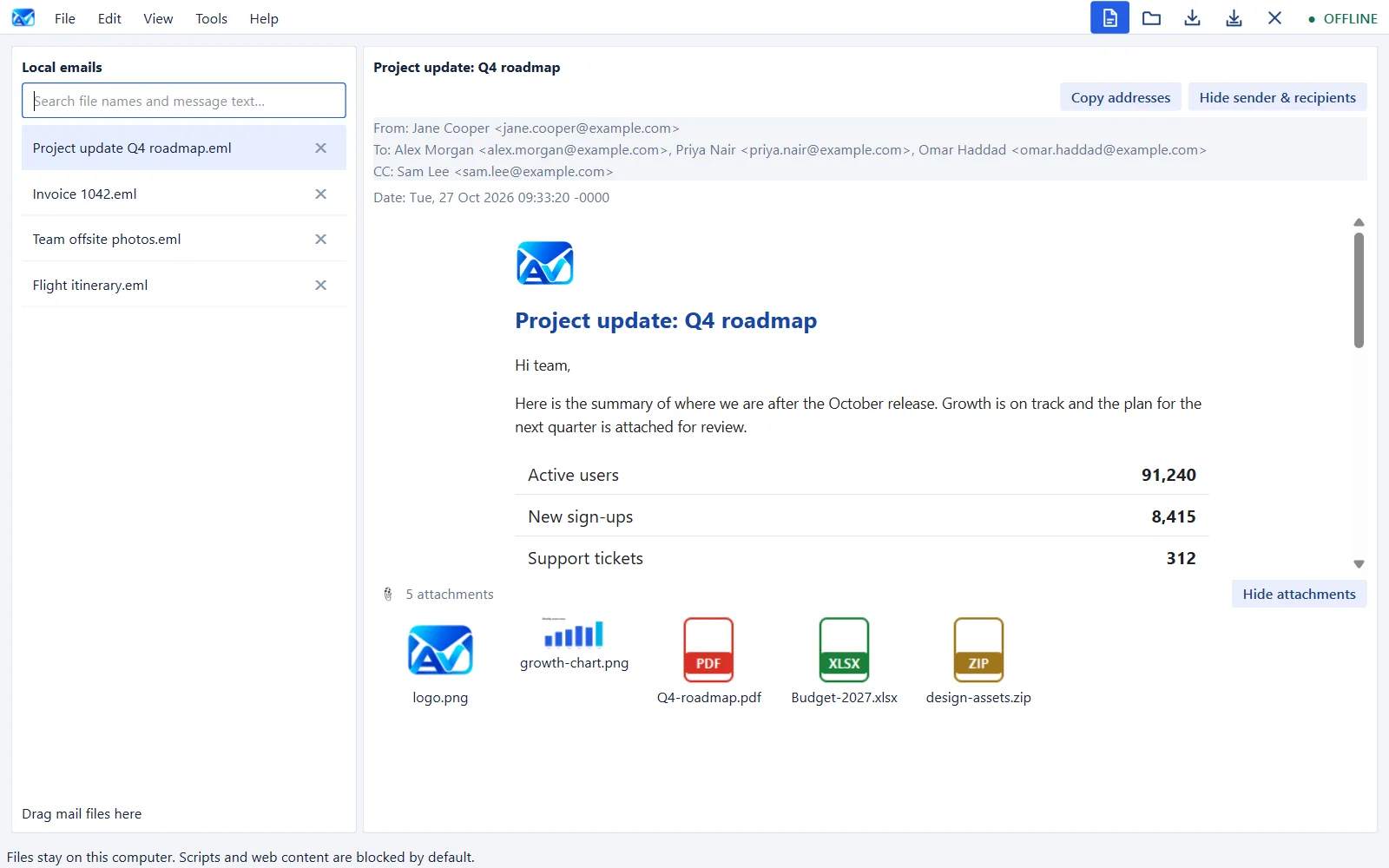
A gallery with an image viewer, open files in the app you choose, save one or all, and unpack Outlook winmail.dat attachments.
Hide what you don’t need
One click hides the sender and recipients or the attachment list — and the app always tells you something is hidden.
Search, print, export
Search file names and message text, find inside a message, print, export to PDF, HTML, text or EML, and copy every address in one go.
Safe by default
Links never open silently — you see the real address and confirm. Programs and scripts can be saved but never launched from an email.
See it in use.
Windows version, shown with sample emails.
Up and running in a minute.
- Download AV Mail Viewer Offline Setup and double-click it.
- If Windows says “Windows protected your PC”, click More info → Run anyway.
- Follow the steps, then click Open files and choose an email. Remove it any time from Settings → Apps.
- Download the APK on your phone and tap it.
- Allow installs from your browser or file manager once. If Play Protect says it doesn’t recognise the app, choose Install anyway.
- Open the app and tap Open, or tap any .eml file in your Files app.
What it can open.
| Format | Typical source | Windows | Android |
|---|---|---|---|
| .eml | Gmail, Thunderbird, most mail apps | Yes | Yes |
| .msg / .oft | Microsoft Outlook | Yes | Not yet |
| .emlx | Apple Mail | Yes | Yes |
| .mbox | Archives and exports | Yes | Yes |
| .mht / .mhtml | Saved web pages and mail | Yes | Yes |
| winmail.dat | Outlook attachment wrapper | Unpacked | — |